Free document management software gives you a structured, searchable system for storing, organizing, and controlling access to your business documents — without paying a licensing fee. If you are running a small business or managing a growing team and your files are scattered across email threads, shared drives, and desktop folders, this guide walks through exactly what free document management software can do, which options are worth your time, and where the real limits are.
What Is Free Document Management Software?
Document management software (DMS) is a digital system that stores, organizes, retrieves, and tracks documents in a centralized repository. A free document management software solution gives you those core capabilities at no upfront cost — either through an open-source license, a freemium tier, or a community edition of a commercial product.
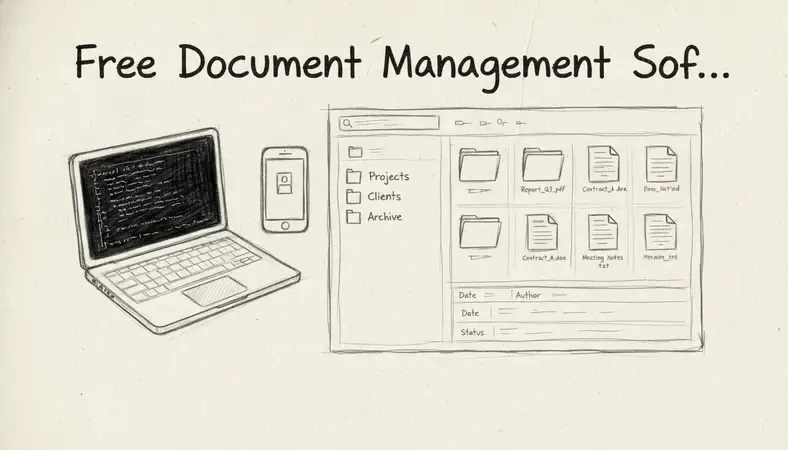
The difference between a DMS and a simple cloud storage folder is significant. A folder stores files. A DMS adds version control, access permissions, audit trails, metadata tagging, full-text search, and workflow automation. When your team needs to find the signed contract from eight months ago, or prove which version of a policy was active during an audit, a DMS delivers that in seconds. A shared drive does not.
Free document management software typically falls into one of three categories:
- Open-source DMS: Full-featured software you download, install, and host yourself. You pay nothing for the license but do need a server and technical setup time.
- Freemium cloud DMS: A vendor offers a limited free tier with storage caps, user limits, or restricted features, hoping you upgrade.
- Community editions: Stripped-down versions of enterprise platforms released free for non-commercial or small-scale use.
Each model has different implications for data control, scalability, and long-term cost — which matters when you are deciding which path fits your organization.
Best Free Document Management Software Options
Several free document management software platforms stand out based on features, reliability, and real-world adoption across Canadian small and medium-sized businesses.
Comparison of Leading Free Document Management Software
| Platform | Type | Best For | Storage Limit | Key Limitation |
|---|---|---|---|---|
| LogicalDOC Community | Open-source | SMBs, regulated sectors | Self-hosted (unlimited) | Requires server setup |
| Alfresco Community | Open-source | Enterprise-scale teams | Self-hosted (unlimited) | Steep learning curve |
| OpenKM Community | Open-source | Document-intensive workflows | Self-hosted (unlimited) | Limited UI polish |
| Paperless-ngx | Open-source | Paperless office initiatives | Self-hosted (unlimited) | Basic collaboration tools |
| Google Drive (free tier) | Freemium cloud | Individuals and micro-teams | 15 GB | Not a true DMS |
The table above reflects the honest tradeoff: cloud freemium tools are easy to start but hit storage and feature walls quickly. Open-source platforms give you full control and no storage ceiling, but require you to own the infrastructure.
LogicalDOC Community Edition, available at www.logicaldoc.com, is one of the most capable free document management software options for organizations that need real DMS features — including document version control, role-based access, full-text indexing, and audit logging — without a per-user licensing fee. It runs on Windows, Linux, and macOS servers, and supports databases including MySQL, PostgreSQL, and Microsoft SQL Server.
For teams exploring Enhancing Document Management capabilities beyond basic file storage, LogicalDOC's community edition provides a meaningful starting point that scales into its commercial tiers without requiring a platform migration.
Key Features to Look For in Free DMS
Not all free document management software delivers the same value. Here is what separates a functional DMS from a folder with a fancy interface.
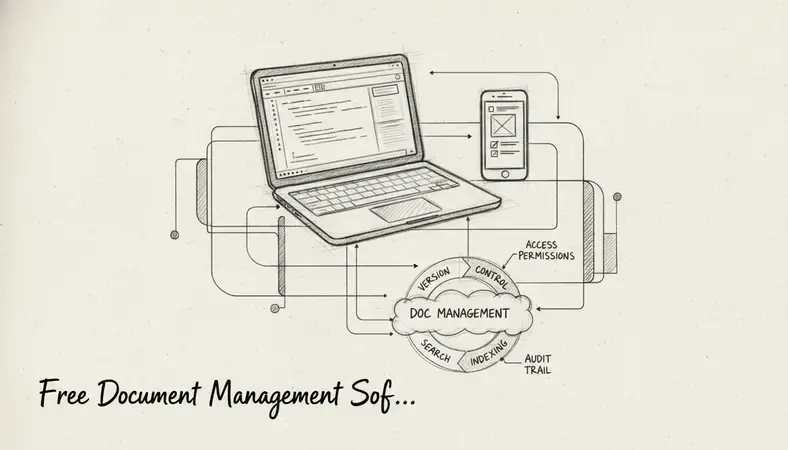
Version control
Document Version Control is non-negotiable for any team editing shared files. A proper DMS keeps every previous version of a document, records who made changes and when, and lets you restore any earlier version in one click. Without this, you are one accidental overwrite away from losing work permanently.
Full-text search
You should be able to search inside documents, not just by file name. Full-text indexing means the system reads the content of every PDF, Word file, and spreadsheet and makes it searchable. This is what makes a DMS genuinely useful at scale — finding the specific clause in a contract from three years ago takes three seconds, not three hours.
Access permissions and role-based controls
Who can read a document, who can edit it, and who can delete it should be configurable at the folder, document, and user level. Free document management software that lacks granular permissions is a liability in any regulated environment.
Audit trails
An audit trail records every action taken on every document — who opened it, who downloaded it, who changed it, and when. For organizations in regulated sectors (healthcare, finance, legal), this is not optional. It is how you demonstrate compliance during an inspection.
Metadata and tagging
Attaching structured metadata to documents — department, project, client, document type, expiry date — turns your repository into a queryable database. Free document management software with strong metadata support dramatically reduces the time staff spend searching for files.
Integration capabilities
The AI Revolution in Document Management is making integrations increasingly important. Look for free document management software that connects with the tools your team already uses — email clients, office suites, and collaboration platforms. LogicalDOC, for example, has expanded its integration ecosystem with tools like OnlyOffice, which enables in-browser document editing directly within the DMS environment.
Free vs Paid Document Management Software
The honest answer is that free document management software handles most of what small and medium-sized businesses need day-to-day. The gaps appear as your organization grows.
Where free document management software holds up well
- Core storage, retrieval, and version control for document-heavy teams
- Full-text search across hundreds or thousands of documents
- Basic workflow routing and approval processes
- Access control for teams up to 20–30 users
- Compliance-ready audit trails in open-source deployments
Where paid tiers pull ahead
- Advanced workflow automation with conditional logic and multi-step approvals
- Enterprise integrations (Salesforce, SAP, Microsoft 365 at scale)
- Dedicated vendor support with SLA guarantees
- Automated retention policies and legal hold features
- Higher concurrent user performance and enterprise-grade uptime
Key Insight: The real cost of free document management software is not the license — it is the time your team spends on setup, maintenance, and working around missing features. Calculate that honestly before committing to an open-source deployment without internal technical resources.
The hidden cost calculation
A 10-person team spending two extra hours per week searching for documents — because their system lacks proper indexing — loses roughly 1,040 hours annually. At a conservative average hourly rate of $35 CAD, that is $36,400 per year in lost productivity. Free document management software that eliminates that friction pays for itself immediately, even if you eventually move to a paid tier.
How to Choose the Right Free Solution for Your Needs
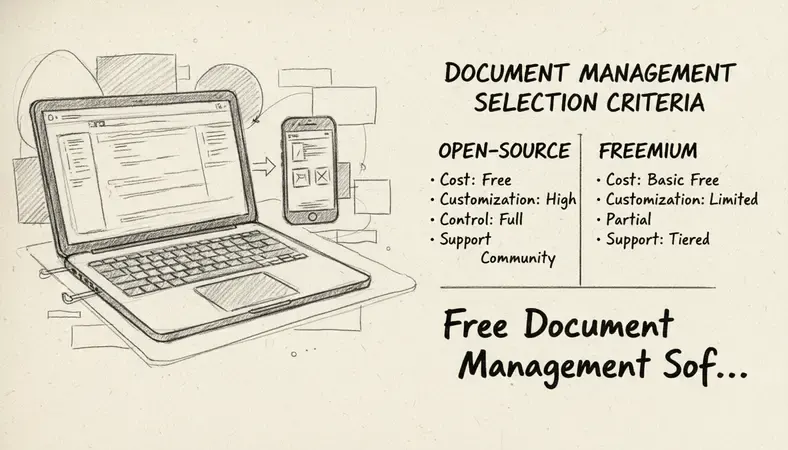
The right free document management software depends on three factors: your technical capacity, your compliance requirements, and your expected growth rate.
Step-by-step selection process
Audit your current document volume: Count how many documents your team creates, receives, and stores monthly. If you are already managing thousands of files, a freemium tool with a 15 GB cap will not last six months.
Identify your compliance obligations: Organizations in healthcare, finance, legal, or government contracting in Canada need audit trails, access logging, and potentially data residency controls. Open-source self-hosted free document management software gives you full control over where data lives.
Assess your technical resources: Open-source platforms like LogicalDOC Community require a server, a database, and someone comfortable with basic system administration. If your team has no IT capacity, a freemium cloud tool is the more realistic starting point.
Define your must-have features: List the five features your team cannot operate without. Check each free document management software option against that list before evaluating anything else.
Test with real documents: Run a 30-day pilot with actual files from your business — not sample data. Real-world performance with your document types and your team's search habits will reveal gaps that feature lists never show.
Plan your exit: Before you commit, understand what it takes to migrate out. Can you export all documents with their metadata intact? Free document management software that locks your data in a proprietary format is a long-term risk.
Limitations of Free Document Management Tools
Free document management software is genuinely capable, but understanding its limits protects you from choosing a solution that breaks down at the worst possible moment.
Storage and user caps are the most immediate limitation in freemium cloud tools. Many free tiers cap storage at 5–15 GB and limit teams to 3–5 users. For a growing business, these walls appear faster than expected.
Support gaps are the most underestimated risk. Open-source free document management software comes with community forums, not guaranteed response times. When a document repository goes down before an audit, a forum post is not the same as a support ticket with a four-hour SLA.
Missing enterprise features become visible as workflows grow more complex. Automated retention schedules, legal hold, e-signature integration, and advanced reporting are typically reserved for paid tiers.
Maintenance burden is real for self-hosted open-source deployments. Security patches, database maintenance, and version upgrades are your responsibility. A sudden power outage or server failure without proper backup procedures can mean data loss — something a managed cloud deployment handles automatically.
Scalability ceilings appear when concurrent users and document volumes grow. Free document management software optimized for small teams can degrade noticeably in performance when a 50-person organization pushes it hard.
The organizations that get the most from free document management software are those that match the tool to their actual current scale — not the scale they hope to reach in three years.
How to Get Started with Free Document Management Software
Getting started with free document management software does not require a major IT project. A focused four-week rollout is realistic for most small and medium-sized businesses. Ready to get started? Visit LogicalDOC to learn more.
Week 1: Prepare your environment
- Choose your platform based on the selection criteria above
- For open-source tools: provision a server (on-premises or a cloud VM), install the required database, and run the installer
- For freemium cloud tools: create an account and configure your first workspace
- Set up administrator credentials and review default security settings
Week 2: Build your folder structure and metadata schema
- Map your existing document categories to a logical folder hierarchy before migrating anything
- Define the metadata fields your team will use — document type, department, project, status, expiry date
- Configure user roles and access permissions before importing documents
Week 3: Migrate and index existing documents
- Start with one department or document category — do not attempt a full migration in one pass
- Upload documents in batches, applying metadata consistently as you go
- Run test searches to confirm full-text indexing is working correctly
Week 4: Train your team and establish workflows
- Run a one-hour training session covering search, upload, version check-out, and metadata tagging
- Document your folder structure and naming conventions in a one-page reference guide
- Identify one workflow to automate first — document approval, contract review, or invoice processing
Common Questions About Free Document Management Software
Is free document management software secure enough for sensitive business documents?
Open-source free document management software like LogicalDOC Community can be configured to a high security standard — including encrypted storage, TLS in transit, role-based access controls, and full audit logging. The security level depends on how well you configure and maintain the deployment. Freemium cloud tools vary significantly: check whether the vendor encrypts data at rest, where servers are located (relevant for Canadian data residency requirements), and what their breach notification policy is.
How many users can use free document management software?
Open-source platforms are typically unlimited in users because you control the server. Freemium cloud tools usually cap free tiers at 3–10 users. For teams larger than that, open-source self-hosted free document management software is almost always the better path economically.
Can free document management software handle compliance requirements in regulated industries?
Yes, with the right platform and configuration. Organizations in regulated sectors need audit trails, access logging, and version history — all of which are available in open-source free document management software like LogicalDOC Community. What free tools typically lack are automated retention policies, legal hold features, and certified compliance frameworks (like ISO 15489 or HIPAA-specific configurations) that enterprise paid platforms offer out of the box.
What is the difference between free document management software and Google Drive?
Google Drive is cloud storage with basic sharing and collaboration features. Free document management software is a purpose-built system with structured metadata, version control, audit trails, workflow routing, and full-text search across document content. Google Drive works well for small teams sharing files informally. A DMS works for organizations that need to control, track, and retrieve documents reliably at scale — especially in document-intensive or regulated environments.
Does free document management software support integration with other business tools?
The best open-source free document management software platforms offer REST APIs and pre-built integrations with common business tools. LogicalDOC, for example, integrates with OnlyOffice for in-browser editing and supports standard protocols like WebDAV and CMIS that allow connection to other enterprise systems. Freemium cloud tools typically offer fewer integration options on free tiers, reserving API access for paid plans.
Final Thoughts
Free document management software is a practical, capable solution for small businesses, growing teams, and document-intensive organizations that cannot justify enterprise licensing costs right now. The key is matching the platform to your actual scale, technical capacity, and compliance needs — and planning for growth before you hit the ceiling.
Organize, control, and retrieve your documents without the licensing cost — explore LogicalDOC's free Community Edition at www.logicaldoc.com/quote and see how a real DMS performs against your current setup.


Alessandro Gasparini
Latest posts by Alessandro Gasparini (see all)
- Free Document Management Software Guide - 06/16/2026
- HYBRID INNOVATION – NEW QUALITY AND STYLE - 07/28/2017
- The New Office and PDF Documents Viewer in LogicalDOC 7.6; Impressive! - 05/22/2017
- New Website Almost Ready!!!! - 03/27/2017
- LogicalDOC included in the Softpedia software database - 10/20/2016