Disorganized files cost real money. According to IDC research, employees spend an average of 2.5 hours per day searching for documents they cannot find — that is roughly 30% of a standard workday lost to a problem that is entirely solvable. If your team is emailing files back and forth, maintaining multiple versions of the same contract, or scrambling before an audit, you already know the pain.
Business document management is the structured approach to capturing, organizing, storing, securing, and retrieving the documents your organization creates and receives every day. This guide walks through exactly how it works, what features matter most, and how to choose the right system for your organization.
What Is Business Document Management?
Business document management refers to the systematic process of controlling the lifecycle of documents within an organization — from creation and review through approval, storage, retrieval, and eventual disposition. A document management system (DMS) is the software that makes this process automated, auditable, and scalable.
The concept goes well beyond simply saving files to a shared drive. Effective business document management establishes governance rules: who can create a document, who can edit it, who can approve it, and who can delete it. Every action is logged. Every version is preserved. Every access is controlled.
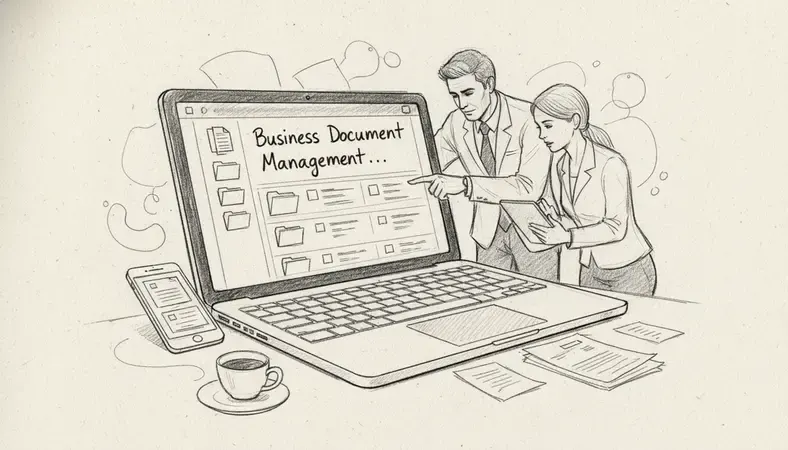
For a small business, this might mean replacing a chaotic mix of email attachments and desktop folders with a single, searchable repository. For a mid-sized company, it often means connecting document workflows to existing tools like CRM platforms, ERP systems, or HR software. For organizations in regulated sectors — healthcare, legal, finance, construction — business document management is also a compliance requirement, not just an operational preference.
Key Insight: The difference between a shared drive and a true document management system is governance. A shared drive stores files. A DMS controls who touches them, tracks every change, and proves it — which is exactly what regulators and auditors want to see.
The Document Lifecycle
Every document in an organization moves through a predictable lifecycle:
- Creation: A document is drafted, often from a template, by an authorized user.
- Review and collaboration: Colleagues annotate, comment, or edit the draft.
- Approval: A designated approver signs off, creating an official version.
- Distribution: The document is shared internally or externally with controlled permissions.
- Storage and retrieval: The document is indexed and archived for future search and access.
- Retention and disposition: At the end of its defined retention period, the document is archived long-term or securely destroyed.
Business document management systems automate transitions between these stages, reducing manual handoffs and the errors that come with them.
Key Features of Document Management Systems
Not every DMS delivers the same capabilities. When evaluating business document management solutions, these are the features that separate functional systems from genuinely useful ones.
Document Version Control
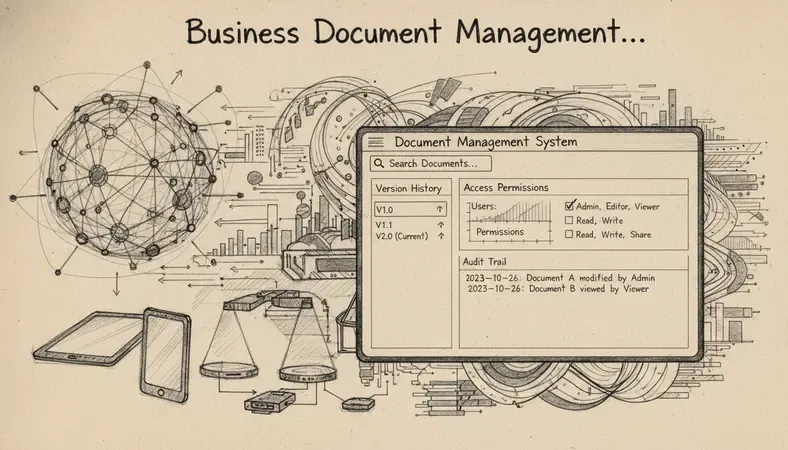
Document version control is the ability to track every change made to a file over time, preserve previous versions, and identify exactly who made which edit and when. Without it, teams routinely overwrite work, lose approved drafts, or distribute outdated contracts. With it, you can roll back to any prior version in seconds.
For organizations exploring Enhancing Document Management capabilities, version control is typically the first feature that delivers immediate, measurable value — particularly in environments where contracts, policies, or technical specifications go through multiple revision cycles.
Full-Text Search and Metadata Indexing
A document management system that cannot surface the right file in seconds is a filing cabinet with a better interface. Quality systems index both the content of documents (full-text search) and structured metadata fields like document type, author, date, client name, and status. This means you can find a specific contract by searching a clause within it, not just by remembering what you named the file.
Access Controls and Permission Management
Role-based access control (RBAC) ensures that employees see only the documents they are authorized to see. A finance team member should not have access to HR personnel files. A contractor should not be able to download proprietary product specifications. Business document management systems enforce these boundaries automatically, and log every access attempt for audit purposes.
Workflow Automation
Approval workflows, review routing, and notification triggers reduce the manual coordination that slows document-intensive processes. A purchase order can automatically route to a department head, then to finance, then to a vendor — with each step timestamped and every approver's action recorded.
Audit Trails
Every compliant business document management system maintains an immutable log of every action taken on every document: who opened it, who edited it, who approved it, who shared it, and when. This audit trail is what regulators, insurers, and legal teams rely on when something goes wrong.
Integration Capabilities
Modern business document management does not exist in isolation. The LogicalDOC grows with Onlyoffice integration approach — connecting document management directly to office productivity tools — is a strong example of how a DMS should fit into your existing software stack rather than requiring users to change their entire workflow.
Document Management vs. File Sharing Solutions
This is one of the most common points of confusion for organizations evaluating their options. File sharing tools like Google Drive, Dropbox, or SharePoint are not document management systems, even though they store and share files.
Comparison of Document Management vs. File Sharing
| Capability | File Sharing Tools | Document Management Systems |
|---|---|---|
| Version control | Basic (limited history) | Full version history with rollback |
| Audit trails | Minimal or none | Complete, immutable logs |
| Workflow automation | Not available | Built-in approval and routing |
| Compliance features | Not designed for compliance | Built for regulated environments |
| Metadata and indexing | Folder-based only | Rich metadata + full-text search |
| Retention policies | Manual management | Automated lifecycle rules |
| Access controls | Folder-level permissions | Document-level, role-based controls |
The distinction matters most when your organization faces an audit, a legal discovery request, or a compliance review. File sharing tools can tell you a file exists. A document management system can prove every action taken on that file since it was created.
For small businesses, a file sharing tool may be sufficient in the early stages. The moment you hire beyond ten people, operate in a regulated sector, or need to demonstrate compliance with any external standard — PIPEDA in Canada, HIPAA in healthcare, SOC 2 for technology companies — business document management becomes a functional requirement.
Compliance and Security Considerations
Business document management and regulatory compliance are inseparable for most organizations. Canadian businesses operating under PIPEDA — the Personal Information Protection and Electronic Documents Act — must demonstrate that personal information is collected, stored, and disposed of with appropriate safeguards. A DMS provides the technical controls and documentation to prove it.
What Compliance Requires from Your DMS
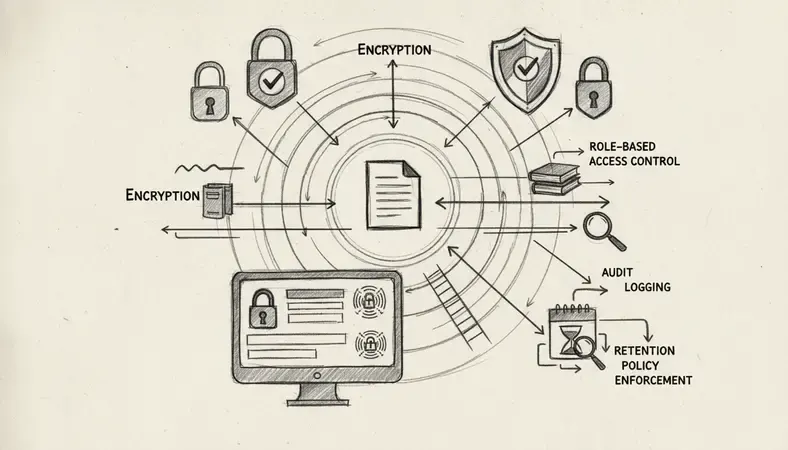
- Retention scheduling: Documents must be kept for legally defined periods — typically seven years for financial records in Canada — and destroyed securely afterward. A DMS enforces these schedules automatically.
- Encryption at rest and in transit: All document content should be encrypted using current standards (AES-256 is the benchmark) both when stored and when transmitted.
- Disaster recovery: A sudden power interruption, server failure, or ransomware attack can destroy years of unprotected records in minutes. Business document management systems with redundant cloud storage and automated backup eliminate this risk.
- Access logging: Every access, every download, every permission change must be logged with a timestamp and user identity.
- Data residency: For Canadian organizations with data sovereignty requirements, confirm that your DMS provider stores data within Canadian borders or within jurisdictions that meet your legal obligations.
Security and compliance are not the same thing, but they reinforce each other. A system with strong access controls, encryption, and audit logging satisfies both the technical security standard and the compliance documentation requirement simultaneously.
ROI and Business Benefits of DMS
Business document management is an operational investment. The return on that investment comes from several directions simultaneously, and it compounds over time.
Where the ROI Comes From
Time recovery. If your team of 20 people each spends 30 minutes per day searching for documents — a conservative estimate — that is 10 person-hours lost every day. A well-implemented DMS typically reduces document retrieval time by 50–80%. At that scale, the time savings alone justify the system cost within months.
Error reduction. Duplicate files, outdated versions sent to clients, and approval steps that get skipped — these are not just inefficiencies. They create liability. Business document management eliminates the conditions that produce these errors by enforcing a single authoritative version and a defined approval path.
Audit readiness. Organizations that face regulatory audits without a DMS spend weeks pulling records manually. Organizations with a DMS can produce a complete audit package — every document, every version, every access log — in hours. The cost of manual audit preparation, measured in staff time and external consulting fees, frequently exceeds the annual cost of a DMS.
Remote and hybrid work support. Business document management systems provide secure, role-appropriate access to every file from any device, anywhere. This is not a convenience feature — it is an operational requirement for any organization with remote employees or multiple office locations.
Reduced storage costs. Paper storage, physical filing systems, and the real estate they occupy carry real costs. Digital business document management eliminates these while simultaneously improving retrieval speed.
Why It Matters: A 2022 report by Nucleus Research found that document management automation delivers an average ROI of $6.15 for every $1 invested — driven primarily by productivity gains and error reduction. For document-intensive organizations, the multiplier is higher.
Implementation Best Practices for Organizations
Getting business document management right requires more than selecting software. The implementation process determines whether adoption succeeds or fails.
Step-by-Step Implementation Approach
Audit your current state: Map every document type your organization creates and receives. Identify where documents currently live, who accesses them, and what retention obligations apply to each category.
Define your taxonomy: Before importing a single file, establish a logical folder structure, naming conventions, and metadata schema. Business document management systems are only as organized as the rules you build into them.
Set access policies: Define roles and permissions before go-live. Determine which departments, job functions, and external users need access to which document categories — and at what permission level (view, edit, approve, delete).
Configure retention schedules: Map your legal and regulatory retention requirements to document categories and configure automated retention rules within the system.
Migrate existing documents: Import legacy files systematically, applying your new taxonomy and metadata schema. Resist the temptation to dump everything in bulk — a messy migration creates a messy system.
Train users before launch: Business document management adoption fails most often because users revert to old habits. Training should cover not just how to use the system, but why the new process matters for their specific role.
Review and refine: Schedule a 90-day post-launch review. Identify where users are working around the system rather than within it — these friction points reveal configuration gaps that need addressing.
Organizations exploring the AI Revolution in Document Management capabilities should note that AI-assisted features — automatic metadata tagging, intelligent search, document classification — work best when the underlying taxonomy and governance structure are already clean. AI amplifies good organization. It cannot fix poor organization.
Selecting the Right Document Management Solution
The business document management market includes options that range from lightweight cloud tools to enterprise-grade on-premise platforms. Matching the solution to your organization's actual requirements — rather than buying the most feature-rich option available — is the practical standard.
Key Selection Criteria
| Criteria | What to Evaluate |
|---|---|
| Deployment model | Cloud, on-premise, or hybrid — based on your data sovereignty and IT requirements |
| Scalability | Can the system grow from 10 users to 200 without a platform change? |
| Integration | Does it connect to your existing CRM, ERP, email, or office productivity tools? |
| Compliance features | Does it support the specific regulations your industry requires? |
| Usability | Will your team actually use it, or will they work around it? |
| Support and training | What implementation support and ongoing training does the vendor provide? |
| Vendor stability | Is the vendor an established provider with a clear product roadmap? |
LogicalDOC is designed specifically for small and medium-sized organizations that need genuine document management capabilities — version control, audit trails, workflow automation, and compliance features — without the implementation complexity or cost of enterprise platforms. The system supports on-premise deployment for organizations with data residency requirements, as well as cloud deployment for teams that prioritize accessibility. You can explore the full feature set at www.logicaldoc.com.
For organizations in regulated sectors, the compliance checklist should drive the selection conversation. Ask every vendor specifically: how does your system support PIPEDA compliance? How does it handle retention scheduling? What does an audit trail export look like? The answers reveal whether the vendor understands your actual requirements.
Common Questions About Business Document Management
What is the difference between a DMS and an ECM system?
A document management system (DMS) focuses specifically on the capture, storage, retrieval, and control of documents. An enterprise content management (ECM) system is a broader category that includes DMS capabilities but extends to managing all forms of unstructured content — emails, images, video, web content, and more. For most small and medium-sized organizations, a DMS provides everything they need. ECM platforms are typically justified for large enterprises managing content across multiple channels and formats.
How long does it take to implement a document management system?
Implementation timelines depend heavily on the volume of legacy documents being migrated and the complexity of your workflow requirements. A straightforward cloud deployment for a team of 20–50 users, with a clean document taxonomy and limited legacy migration, can be operational within two to four weeks. A full enterprise deployment with complex integrations, large-scale migration, and custom workflows typically takes three to six months. The single biggest factor in implementation speed is how prepared your organization is before the software is installed — taxonomy decisions, access policies, and retention rules should be defined before configuration begins.
Is cloud-based document management secure enough for regulated industries?
Cloud-based business document management can meet the security requirements of regulated industries when the vendor implements appropriate controls: AES-256 encryption at rest and in transit, SOC 2 Type II certification, role-based access control, immutable audit logs, and data residency options. Canadian organizations should specifically confirm that data is stored within Canada or within jurisdictions that satisfy PIPEDA obligations. On-premise deployment remains an option for organizations with the strictest data sovereignty requirements.
Can a small business justify the cost of a document management system?
A small business with even five employees generating contracts, invoices, HR records, and compliance documentation is already managing a document problem — the question is whether it is being managed intentionally or accidentally. The cost of a DMS for a small team is typically modest. The cost of a lost contract, a failed audit, or a version control error that sends the wrong document to a client is not. Most small businesses that implement business document management report that the productivity gains alone offset the system cost within the first year.
What happens to documents when we switch DMS platforms?
Most established business document management systems support standard export formats — typically a combination of the original file formats plus associated metadata in XML or CSV. Before selecting any platform, confirm that your documents can be exported in a format that is not proprietary to that vendor. This protects your organization if you need to migrate to a different system in the future. LogicalDOC, for example, supports open standards that allow document export without vendor lock-in.
Key Takeaways
Business document management is not a technology purchase — it is an operational decision that affects every person in your organization who creates, reviews, approves, or retrieves a file. The right system eliminates wasted search time, enforces compliance, and gives you a defensible record of every document action.
Organize, control, and secure your documents with LogicalDOC — purpose-built for small and medium-sized organizations that need real document management without enterprise complexity. Ready to get started? Visit LogicalDOC to learn more.

Latest posts by Cristian Fulger (see all)
- Document Management Tools: A Practical Guide - 10/19/2026
- Open Source Document Management Systems - 10/05/2026
- Document Management Explained - 09/01/2026
- Open Source Document Management System - 08/25/2026
- Business Document Management Explained - 08/19/2026