Managing business documents without a proper system is like running a library where anyone can reshelf books anywhere they like — chaos builds slowly until an interruption in operations forces the issue. An open source document management system gives your organization a structured, searchable, and secure way to store, organize, and share documents, without paying expensive licensing fees to a proprietary vendor.
If you are evaluating whether an open source document management system fits your organization — whether you run a small business, a growing company, or operate in a document-intensive sector like healthcare, legal, or finance — this guide covers everything you need to make a sound decision.
What Is an Open Source Document Management System?
An open source document management system (DMS) is software that helps organizations capture, store, organize, retrieve, and manage documents — and whose source code is publicly available for anyone to inspect, modify, and redistribute.
The "open source" part means you are not locked into a single vendor's roadmap or pricing structure. You can download the software, run it on your own servers, and — if you have the technical resources — customize it to fit your exact workflows. The "document management" part means the system handles the full lifecycle of a document: from the moment it enters your organization to archiving or deletion.
A typical open source document management system handles files of all types — PDFs, Word documents, spreadsheets, images, emails — and gives every document a searchable home with version history, access controls, and audit trails.
Key Insight: According to AIIM, organizations that implement a formal document management system reduce time spent searching for documents by up to 30%, and document-related errors drop significantly when version control is enforced.
How It Differs from a Simple File Server
A shared network drive stores files. An open source document management system manages them. The difference is meaningful in practice. A DMS applies metadata tagging so you can find a contract by client name, date, or document type — not just by remembering the folder path. It tracks who changed what and when. It enforces who can view, edit, or delete each document. A file server does none of this automatically.
Benefits of Open Source Document Management Systems
Organizations choose an open source document management system for reasons that go well beyond cost savings, though the cost advantage is real and substantial.
No Licensing Fees
Proprietary document management platforms charge per user, per month, or both. A team of 50 people on a mid-tier proprietary DMS can easily spend tens of thousands of dollars annually just on licensing. An open source document management system eliminates that line item entirely. You pay for hosting, implementation, and support — not for the right to use the software.
Full Control Over Your Data
When you run an open source document management system on your own infrastructure, your documents never leave your servers unless you choose to move them. For organizations in regulated sectors — healthcare under PIPEDA in Canada, legal firms, financial institutions — this matters enormously. You control the encryption, the backup schedule, and the access logs.
Customization Without Vendor Dependency
Proprietary vendors decide what features get built and when. With an open source document management system, your team (or a developer you hire) can modify the software to match your specific workflows. Need a custom approval chain for purchase orders? A specialized metadata schema for engineering drawings? You can build it.
Community-Driven Improvement
Active open source projects benefit from contributions by developers worldwide. Security vulnerabilities get patched quickly because many eyes review the code. New integrations appear regularly. The community around a well-maintained open source document management system often produces plugins, extensions, and documentation that rival what proprietary vendors offer.
Avoiding Vendor Lock-In
A sudden power shift in a vendor's ownership, pricing model, or product direction can leave your organization scrambling. An open source document management system means the software continues to exist and function regardless of what any single company decides to do.
Popular Open Source Document Management Solutions
Several mature open source document management systems have established track records across industries. Here is an honest look at the most widely deployed options.
LogicalDOC
LogicalDOC is an enterprise-grade open source document management system built on Java, designed for organizations that need a balance between deep functionality and usability. It offers full-text search, document version control, workflow automation, role-based access control, and a clean web interface accessible from any browser. LogicalDOC also supports integration with tools like OnlyOffice for in-browser document editing — the LogicalDOC grows with Onlyoffice integration makes collaborative editing on stored documents straightforward without leaving the DMS environment. You can explore the platform at www.logicaldoc.com.
Alfresco Community Edition
Alfresco is one of the most widely recognized open source document management systems globally. The community edition is free; the enterprise edition is commercial. It offers strong content repository features and integrates well with enterprise systems, but it requires significant technical expertise to deploy and maintain.
Nuxeo
Nuxeo is a content services platform with open source roots. It handles complex content workflows and scales to very large document volumes. The learning curve is steep, and production deployments typically require dedicated engineering resources.
OpenDocMan
OpenDocMan is a lightweight, web-based open source document management system suited to smaller teams. It is simpler to set up than Alfresco or Nuxeo but offers fewer enterprise features. For a small business with straightforward document storage needs, it can be a practical starting point.
Open Source vs Proprietary Document Management Systems
Choosing between an open source document management system and a proprietary one is not simply a cost calculation. The right answer depends on your technical resources, compliance requirements, and how much flexibility you need.
Comparison of Open Source vs Proprietary Document Management Systems
| Factor | Open Source DMS | Proprietary DMS |
|---|---|---|
| Licensing cost | Free (pay for hosting/support) | Per-user or per-seat fees |
| Customization | Full access to source code | Limited to vendor-provided options |
| Data control | Self-hosted, full control | Vendor-hosted (typically cloud) |
| Implementation effort | Higher — requires IT resources | Lower — vendor handles setup |
| Ongoing support | Community + paid support options | Vendor support included |
| Integration flexibility | High — APIs and plugins | Depends on vendor ecosystem |
| Vendor lock-in risk | None | High |
| Security auditing | Full code transparency | Black box — trust the vendor |
The table makes clear that an open source document management system wins on cost, control, and flexibility. A proprietary system wins on ease of initial setup and the comfort of a single vendor relationship. Organizations with limited IT capacity sometimes find that the lower implementation barrier of a proprietary system justifies the higher ongoing cost.
Key Features to Look For
Not every open source document management system offers the same capabilities. When evaluating options, these are the features that separate genuinely useful systems from ones that create new problems.
Full-Text Search
The ability to search inside documents — not just by filename — is non-negotiable. A system that can index and search the content of PDFs, Word files, and scanned documents saves hours every week across a team.
Document Version Control
Every time a document changes, the system should save the previous version and record who made the change and when. Document version control prevents the scenario where someone overwrites a finalized contract with an outdated draft. LogicalDOC's version control, for example, lets you compare versions side by side and restore any prior version with a single action. Enhancing Document Management through robust version tracking is one of the highest-value capabilities any DMS can offer.
Role-Based Access Control
Different people in your organization need different levels of access. An accountant should not be able to edit engineering specifications. A junior employee should not be able to delete signed contracts. A solid open source document management system lets you define granular permissions by user, group, folder, or document type.
Workflow Automation
Approval workflows, document routing, and notification triggers reduce the manual coordination that bogs down document-intensive processes. Look for a system that lets you build workflows without writing code — visual workflow designers are a significant usability advantage.
Audit Trail and Compliance Logging
For regulated organizations, every access event, edit, and download needs to be logged and reportable. A complete audit trail is not optional in sectors like healthcare, finance, or government contracting.
Integration Capabilities
Your open source document management system should connect to the tools your team already uses — email clients, ERP systems, CRM platforms, and collaboration tools. REST APIs and pre-built connectors reduce integration effort significantly.
How to Implement an Open Source Document Management System
Implementation is where many organizations underestimate the effort involved. A well-planned deployment, however, produces a system that genuinely improves daily operations rather than adding another tool to manage.
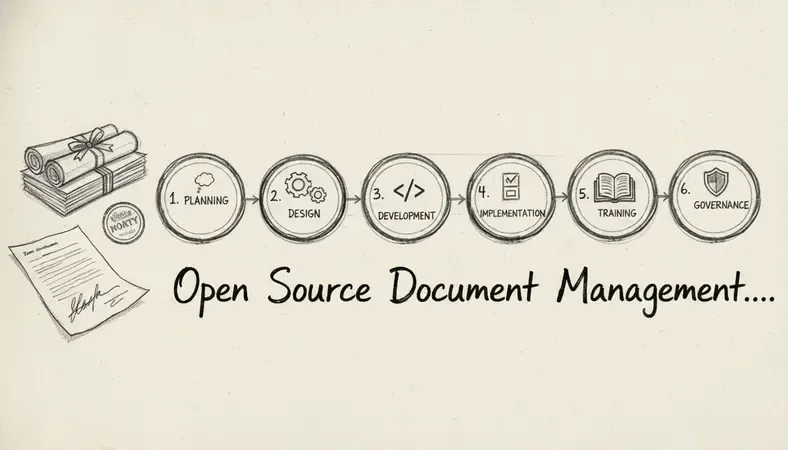
Define your document taxonomy: Before installing anything, map out how your organization categorizes documents. What types exist? What metadata matters — client name, project number, document status, department? A clear taxonomy built before implementation prevents a disorganized digital filing cabinet.
Assess your infrastructure: Decide whether you will host the system on-premises or in a private cloud. On-premises gives maximum control; a private cloud deployment reduces hardware management overhead. Either way, plan for adequate storage, backup systems, and network access.
Install and configure the software: Follow the installation documentation for your chosen platform. For LogicalDOC, the installation process is documented at www.logicaldoc.com and supports deployment on Linux, Windows, and cloud environments. Configure your folder structure, user accounts, and access permissions before migrating any documents.
Migrate existing documents: Bulk importing existing files is rarely as simple as dragging and dropping. Plan for deduplication, metadata tagging of legacy files, and a review process to discard outdated documents rather than migrating everything indiscriminately.
Train your team: An open source document management system only delivers value if people use it consistently. Invest in training sessions that show staff how to upload, search, check out, and approve documents. The AI Revolution in Document Management has introduced features like intelligent tagging and automated classification that reduce manual metadata entry — highlight these capabilities during training to accelerate adoption.
Establish governance policies: Define who is responsible for creating new folders, approving document categories, and managing user access. Without governance, even the best open source document management system drifts toward disorder over time.
Cost Comparison and ROI
The total cost of ownership for an open source document management system is genuinely lower than proprietary alternatives for most organizations — but the savings are not automatic. They depend on how you structure your deployment.
Where the Costs Actually Live
With an open source document management system, your costs fall into three buckets:
- Infrastructure: Server hardware or cloud hosting fees. A small team running LogicalDOC on a modest cloud instance might spend a few hundred dollars per month on infrastructure — far less than per-seat licensing for a comparable proprietary system.
- Implementation: The time your IT staff spends on setup, configuration, and migration, or fees paid to an implementation partner. This is a one-time cost that proprietary systems also carry, though they sometimes bundle it into onboarding packages.
- Ongoing maintenance: Updates, backups, and occasional troubleshooting. Open source communities provide security patches and new releases regularly, but someone on your team needs to apply them.
Calculating ROI
Industry research consistently shows that organizations recovering documents faster, reducing duplicate work, and eliminating paper-based processes see measurable returns. A team of 20 people each saving 30 minutes per day searching for documents represents roughly 10 hours of recovered productivity daily. Over a year, that compounds into thousands of hours — and thousands of dollars — returned to productive work.
For organizations in regulated sectors, the ROI calculation also includes risk reduction. A properly implemented open source document management system with complete audit trails and access controls reduces the cost of compliance audits and the risk of regulatory penalties.
Why It Matters: A 2023 report by McKinsey & Company found that knowledge workers spend approximately 20% of their working week searching for internal information or tracking down colleagues to help with documents. A well-implemented document management system directly attacks that 20%.
Common Questions About Open Source Document Management Systems
Is an open source document management system secure?
An open source document management system can be highly secure — often more so than proprietary alternatives, because the source code is publicly auditable and security researchers worldwide can identify and report vulnerabilities. Security depends on how well you configure and maintain the system, not on whether it is open source. Proper role-based access control, encrypted storage, and regular software updates are the practical requirements.
Do I need a dedicated IT team to run an open source DMS?
The honest answer is: it depends on the platform and your organization's size. Simpler open source document management systems like OpenDocMan can be managed by a technically capable non-specialist. Enterprise platforms like LogicalDOC or Alfresco benefit from someone comfortable with server administration, though LogicalDOC's installer and documentation significantly reduce the technical barrier. Many organizations also engage implementation partners for initial setup and then manage ongoing operations internally.
Can an open source DMS handle compliance requirements like HIPAA or PIPEDA?
Yes — provided the system is properly configured. An open source document management system that offers encrypted storage, complete audit logging, role-based access control, and retention policy enforcement can meet the technical requirements of HIPAA, PIPEDA, and similar frameworks. Compliance is a combination of software capability and organizational policy; the software alone does not make you compliant.
How does an open source DMS handle document version control?
Most mature open source document management systems maintain a complete version history for every document. When a user uploads a new version of an existing file, the system saves the previous version rather than overwriting it. You can view the full revision history, compare versions, and restore any prior version. This prevents accidental overwrites and provides a clear record of how a document evolved over time.
What is the difference between an open source DMS and a cloud storage service like Google Drive?
Google Drive and similar services store files. An open source document management system manages them. The practical differences include: metadata and full-text search across document content, formal version control with history, workflow automation for approvals and routing, granular permission structures, complete audit trails for compliance, and the ability to run entirely on your own infrastructure. For organizations with serious document management needs, cloud storage is a starting point — not a solution.
Final Thoughts
An open source document management system is a serious, enterprise-capable approach to managing business documents — not a budget compromise. For organizations that value data control, customization, and long-term cost efficiency, it consistently outperforms proprietary alternatives.
Organize, search, and secure your documents with LogicalDOC — see how the platform handles version control, workflow automation, and compliance logging in a live demo environment. Ready to get started? Visit LogicalDOC to learn more.

Latest posts by Cristian Fulger (see all)
- Document Management Tools: A Practical Guide - 10/19/2026
- Open Source Document Management Systems - 10/05/2026
- Document Management Explained - 09/01/2026
- Open Source Document Management System - 08/25/2026
- Business Document Management Explained - 08/19/2026