Project management software transforms chaos into clarity by organizing tasks, deadlines, and team collaboration in one centralized platform. If you are juggling multiple projects, missing deadlines, or struggling to track who is doing what, the right project management software can eliminate these frustrations and boost your team's productivity by up to 25%.
This guide compares the top project management software options available today, helping you understand which features matter most and which platform fits your specific needs and budget.
What Is Project Management Software?
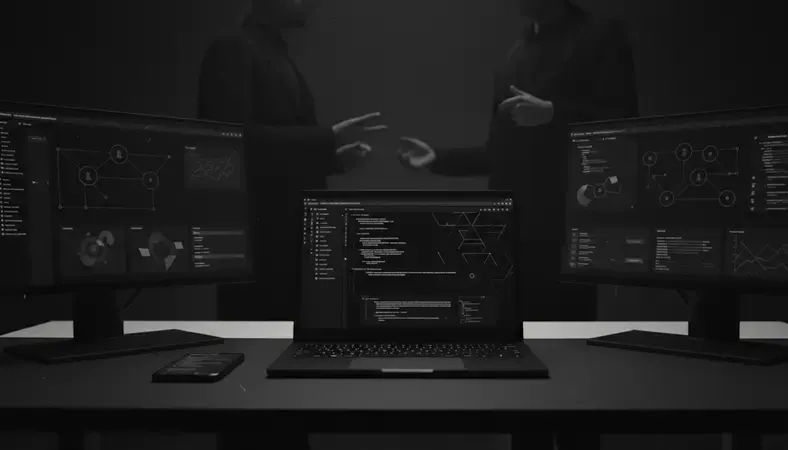
Project management software is a digital platform that helps teams plan, organize, and execute projects from start to finish. These tools provide a centralized workspace where you can create tasks, set deadlines, assign responsibilities, track progress, and communicate with team members.
Think of it as your project's command center. Instead of juggling emails, spreadsheets, and sticky notes, everything lives in one place where everyone can see what needs to be done and when.
The software typically includes features like task management, time tracking, file sharing, team messaging, and progress reporting. Some platforms focus on specific methodologies like Agile or Kanban, while others offer flexible frameworks that adapt to any project type.
Key Insight: The best project management software eliminates the need for multiple tools by combining planning, execution, and communication features in a single platform.
Key Features of Project Management Tools
Understanding the core features helps you evaluate which project management software will serve your needs best. Here are the essential capabilities to look for:
Task Management and Organization
- Task Creation and Assignment: Create detailed tasks with descriptions, due dates, and assign them to specific team members
- Subtasks and Dependencies: Break large tasks into smaller components and set up task dependencies to maintain proper workflow sequence
- Priority Levels: Mark tasks as high, medium, or low priority to help team members focus on what matters most
- Custom Fields: Add project-specific information like budget, client details, or custom status indicators
Collaboration and Communication
- Team Messaging: Built-in chat features for project-specific discussions without cluttering email inboxes
- File Sharing: Upload and share documents, images, and other project files directly within tasks
- Comments and Updates: Leave feedback, ask questions, and provide status updates directly on tasks
- Real-time Notifications: Get instant alerts when tasks are updated, deadlines approach, or team members need input
Progress Tracking and Reporting
- Visual Progress Indicators: See project completion percentages and individual task status at a glance
- Time Tracking: Monitor how much time is spent on different tasks and projects for better resource planning
- Custom Reports: Generate reports on team productivity, project timelines, and budget utilization
- Dashboard Views: Get high-level overviews of all active projects and their current status
Types of Project Management Software
Different project management software solutions cater to various project types and team preferences. Understanding these categories helps you choose the right approach for your organization.
Comparison of Project Management Software Types
| Type | Best For | Key Strengths | Common Limitations |
|---|---|---|---|
| Traditional/Waterfall | Large projects with fixed timelines | Detailed planning, resource allocation | Less flexibility for changes |
| Agile/Scrum Tools | Software development, iterative projects | Sprint planning, backlog management | Steep learning curve |
| Kanban Boards | Visual teams, continuous workflows | Simple interface, flexible workflow | Limited reporting features |
| All-in-One Platforms | Teams needing multiple tools | Comprehensive feature sets | Can be overwhelming for simple projects |
Traditional Project Management Tools
These platforms follow established project management methodologies with features like Gantt charts, resource planning, and detailed project timelines. They work well for construction, manufacturing, and other industries with predictable project phases.
Popular examples include Microsoft Project and Smartsheet, which offer robust planning capabilities but may feel overwhelming for smaller teams or simple projects.
Agile and Scrum-Focused Software
Designed specifically for software development teams using Agile methodologies, these tools emphasize sprint planning, backlog management, and iterative development cycles.
Platforms like Jira and Azure DevOps excel in this space, offering features like story points, burndown charts, and integration with development tools. However, they can be complex for non-technical teams.
Kanban and Visual Management Tools
These platforms use visual boards with cards representing tasks that move through different stages of completion. They are intuitive and flexible, making them popular for marketing teams, creative agencies, and any group that prefers visual workflow management.
Trello pioneered this approach, while tools like Monday.com and ClickUp have expanded on the concept with additional features.

Project Management Software vs Traditional Methods
The shift from traditional project management methods to digital solutions represents one of the most significant productivity improvements for modern teams. Understanding this comparison helps justify the investment and highlights what you gain by making the switch.
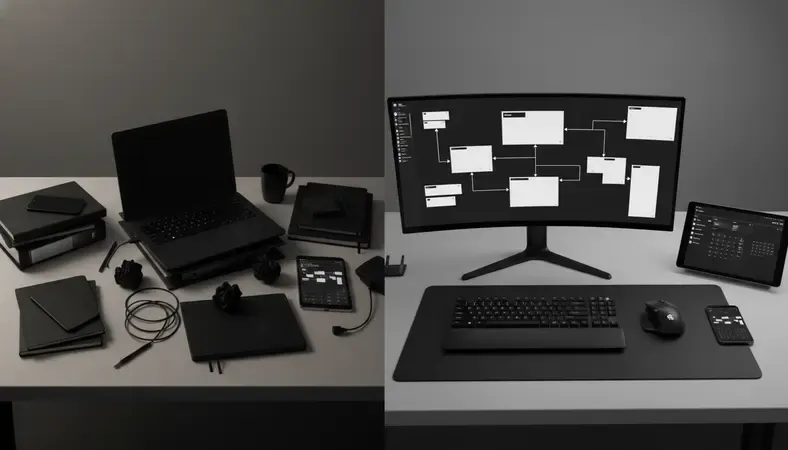
Traditional Methods: Spreadsheets and Email
Many teams still rely on Excel spreadsheets, email chains, and in-person meetings to manage projects. While these tools are familiar and readily available, they create significant bottlenecks as projects grow in complexity.
Spreadsheets require manual updates, offer no real-time collaboration, and become unwieldy with multiple contributors. Email threads lose important information, and finding specific project details becomes a time-consuming treasure hunt.
Digital Project Management Advantages
Project management software eliminates these pain points through centralized information storage, automated notifications, and real-time collaboration features.
Instead of hunting through email threads for the latest project update, team members can see current status, upcoming deadlines, and their specific responsibilities in seconds. File versioning prevents the confusion of multiple document versions, and integrated communication keeps all project-related discussions in context.
The Numbers Tell the Story
Organizations using dedicated project management software report 38% more projects completed successfully and 25% faster project delivery times compared to teams relying on traditional methods.
The time savings alone often justify the cost. Teams spend 40% less time in status meetings and 60% less time searching for project information when using proper project management tools.
How to Choose the Right Project Management Software
Selecting the right project management software requires evaluating your team's specific needs, workflow preferences, and growth plans. The wrong choice can create more problems than it solves, while the right platform becomes an essential productivity multiplier.
Assess Your Team Size and Structure
Small teams under 10 people have different needs than enterprise organizations with hundreds of project participants. Consider not just your current size but where you expect to be in two years.
Smaller teams benefit from simple, intuitive interfaces that do not require extensive training. Larger organizations need robust permission systems, advanced reporting, and integration capabilities with existing business systems.
Identify Your Primary Use Cases
Different project types demand different features. Software development projects need bug tracking and code integration, while marketing campaigns require creative asset management and approval workflows.
Make a list of your three most common project types and ensure any software you consider handles these scenarios well. A tool that excels at everything often excels at nothing.
Budget and Pricing Considerations
Project management software pricing varies dramatically, from free options for basic needs to enterprise solutions with custom pricing. Consider both the direct software costs and the indirect costs of training, setup, and potential productivity loss during transition.
Most platforms offer tiered pricing based on features and user count. Start with essential features and upgrade as your needs grow rather than paying for advanced capabilities you may never use.
Integration Requirements
Your project management software should connect seamlessly with tools your team already uses daily. Common integrations include email platforms, file storage services, time tracking tools, and communication apps like Slack or Microsoft Teams.
Poor integration capabilities force teams to manually transfer information between systems, eliminating much of the efficiency gained from using project management software in the first place.
Popular Project Management Software Options
The project management software market offers solutions for every team size, budget, and project type. Here are the leading platforms that consistently earn high user satisfaction ratings and deliver reliable performance.
Enterprise-Level Solutions
Microsoft project remains the gold standard for large, complex projects requiring detailed resource planning and advanced scheduling capabilities. It integrates seamlessly with other Microsoft Office tools and offers powerful reporting features.
Smartsheet combines spreadsheet familiarity with project management capabilities, making it popular with teams transitioning from Excel-based project tracking. It offers excellent automation features and enterprise-grade security.
Mid-Market Favorites
Asana strikes an excellent balance between powerful features and user-friendly design. It offers multiple project views including lists, boards, timeline, and calendar formats, allowing teams to work in their preferred style.
Monday.com provides highly customizable workflows with an intuitive visual interface. Its strength lies in adaptability, allowing teams to configure the platform for various project types and business processes.
ClickUp positions itself as an all-in-one workspace, combining project management with document creation, goal tracking, and team communication features. It offers extensive customization options but can feel overwhelming initially.
Specialized and Niche Solutions
Jira dominates software development project management with robust issue tracking, sprint planning, and integration with development tools. However, it requires significant setup and training for non-technical users.
Basecamp focuses on simplicity and ease of use, offering essential project management features without overwhelming complexity. It works well for creative teams and client-facing projects but lacks advanced reporting capabilities.
Wrike excels in marketing and creative project management with features like proofing workflows, creative asset management, and campaign tracking. It offers strong collaboration tools and integrates well with creative software.
Benefits of Using Project Management Software
Implementing project management software delivers measurable improvements across multiple aspects of team performance and project outcomes. These benefits compound over time, creating increasingly significant advantages for organizations that fully adopt these tools.
Improved Team Productivity and Efficiency
Project management software eliminates the administrative overhead that consumes significant portions of team members' time. Instead of spending hours updating spreadsheets, searching for files, or clarifying task assignments, team members can focus on actual project work.
Automated notifications ensure nothing falls through the cracks, while centralized file storage eliminates the time waste of version confusion and file hunting. Teams report spending 35% more time on productive work after implementing proper project management tools.
Enhanced Communication and Collaboration
Clear communication becomes automatic when project discussions happen in context rather than scattered across email threads and meetings. Team members can see the complete history of decisions, changes, and feedback without asking for updates.
Remote and distributed teams particularly benefit from this centralized communication approach. Time zone differences become less problematic when all project information and updates are accessible asynchronously.
Better Project Visibility and Control
Project managers gain real-time insight into project status, potential bottlenecks, and resource allocation issues before they become critical problems. This visibility enables proactive management rather than reactive crisis response.
Stakeholders can access current project information without interrupting team members for status updates, reducing meeting overhead and improving overall project communication.
Data-Driven Decision Making
Project management software captures valuable data about team performance, project timelines, and resource utilization patterns. This information enables better estimation for future projects and identifies opportunities for process improvement.
Teams using project management software complete projects 25% faster on average and experience 40% fewer missed deadlines compared to teams using traditional management methods.
Bottom Line: The return on investment for quality project management software typically pays for itself within three months through improved efficiency and reduced project delays.
Common Questions About Project Management Software
How much does project management software typically cost?
Project management software pricing varies significantly based on features and team size. Basic plans start around $5-10 per user per month, while enterprise solutions can reach $50+ per user monthly.
Many platforms offer free tiers for small teams, typically supporting 5-15 users with limited features. Mid-tier plans ($15-25 per user) usually provide the best value for growing teams, including advanced features like time tracking, custom fields, and reporting.
Consider the total cost including setup, training, and potential integration expenses when budgeting. The productivity gains often justify higher-tier plans for teams managing complex or multiple simultaneous projects.
Can project management software work for remote teams?
Project management software is particularly valuable for remote and distributed teams. These platforms provide the centralized communication and visibility that remote teams need to stay coordinated without constant meetings.
Features like real-time updates, file sharing, time zone displays, and asynchronous communication tools are specifically designed to support remote collaboration. Many teams find they communicate more effectively through project management software than they did with in-person meetings.
Cloud-based platforms ensure team members can access project information from anywhere with internet connectivity, making location irrelevant for project participation.
How long does it take to implement project management software?
Implementation timelines vary based on team size, chosen platform complexity, and existing process maturity. Simple tools like Trello or Asana can be operational within days, while enterprise solutions may require weeks or months for full deployment.
Most teams see initial productivity benefits within 2-4 weeks of implementation, with full adoption and optimization occurring over 2-3 months. The key is starting with essential features and gradually expanding usage rather than attempting to implement every feature simultaneously.
Proper training and change management significantly impact adoption success. Teams that invest in training and establish clear usage guidelines achieve better long-term results than those who simply provide access to the software.
What happens to our data if we switch platforms?
Data portability varies significantly between project management platforms. Most established providers offer export capabilities, but the format and completeness of exported data differs.
Before committing to any platform, verify their data export options and test the export process with sample data. Some platforms provide migration assistance or professional services to help transfer data to their system.
Maintain regular backups of critical project data regardless of your chosen platform. This practice protects against both platform changes and potential data loss scenarios.
What This Means for You
Project management software transforms how teams collaborate and execute projects, delivering measurable improvements in productivity and project success rates. The right platform eliminates administrative overhead, improves communication, and provides the visibility needed for proactive project management.
Streamline your document management and project workflows at LogicalDOC — organize, share, and secure your project files effortlessly with our integrated document management system.

Latest posts by Cristian Fulger (see all)
- Project Management Software: Which Is Best? - 03/30/2026
- CRM Resources: Helpful Tools - 03/29/2026
- Essential CRM Resources for Document Teams - 03/28/2026
- Top Customer Interaction Management Software Picks - 03/27/2026
- Project Management Software Comparison Guide - 03/26/2026