A DMS warehouse transforms scattered documents into an organized, searchable digital fortress. Instead of hunting through filing cabinets or multiple folders, everything lives in one secure location where teams can access, share, and collaborate on documents instantly. For businesses drowning in paperwork or struggling with document chaos, a well-designed DMS warehouse becomes the backbone of efficient operations.
This guide covers the essential resources you need to build, implement, and optimize your document management warehouse — from platform selection to integration tools that make everything work seamlessly together.
What Is a DMS Warehouse?
A DMS warehouse serves as a centralized digital repository where organizations store, organize, and manage all their documents. Think of it as a sophisticated digital filing system that goes far beyond simple cloud storage — it includes version control, automated workflows, compliance tracking, and intelligent search capabilities.
Unlike traditional file storage, a DMS warehouse creates structured environments where documents follow consistent naming conventions, metadata standards, and access controls. This systematic approach eliminates the common problems of duplicate files, outdated versions, and documents that disappear into digital black holes.
The warehouse concept emphasizes scalability and enterprise-grade functionality. While basic document storage might work for small teams, organizations with complex compliance requirements or high document volumes need the robust infrastructure that a DMS warehouse provides.
DMS Warehouse vs Traditional Document Storage
Traditional document storage and DMS warehouses serve different organizational needs. Understanding these differences helps you choose the right approach for your business requirements.
Comparison of Storage Approaches
| Feature | Traditional Storage | DMS Warehouse | Cloud Storage |
|---|---|---|---|
| Organization | Manual folder structure | Automated categorization | Basic folder hierarchy |
| Search Capability | File name only | Full-text content search | Limited metadata search |
| Version Control | Manual file naming | Automatic versioning | Basic version history |
| Access Control | Folder-level permissions | Granular document permissions | Share-based access |
| Compliance | Manual audit trails | Automated compliance reporting | Basic activity logs |
| Workflow Integration | None | Built-in approval workflows | Third-party integrations |
Traditional storage relies heavily on human organization and discipline. Users create folder structures, name files consistently, and manually manage access permissions. This approach works for small teams but breaks down as organizations grow and document volumes increase.
DMS warehouses automate many of these processes. Documents get tagged with metadata automatically, search functions examine file contents rather than just names, and the system tracks every interaction for compliance purposes. This automation reduces human error and ensures consistency across the organization.
The investment in a DMS warehouse pays dividends when teams spend less time searching for documents and more time using them productively. Organizations often see immediate improvements in project timelines and collaboration effectiveness.
Key Features of DMS Warehouse Solutions
Modern DMS warehouse platforms offer sophisticated capabilities that transform how organizations handle their document workflows. These features work together to create comprehensive document management ecosystems.
Intelligent document capture automatically extracts metadata from uploaded files, recognizing document types, dates, and key information without manual input. This feature significantly reduces the administrative burden of document organization while ensuring consistency across the system.
Advanced Search and Retrieval capabilities extend far beyond simple file name searches. Users can search within document contents, filter by metadata fields, and use natural language queries to find relevant information quickly. Some platforms include AI-powered search that understands context and intent.
Automated workflow management routes documents through predefined approval processes, sending notifications to relevant stakeholders and tracking progress automatically. This feature eliminates bottlenecks and ensures important documents move through review cycles efficiently.
Comprehensive security controls protect sensitive information through role-based access permissions, encryption, and detailed audit trails. Organizations can control who sees what information and track every interaction for compliance reporting.
Integration capabilities connect the DMS warehouse with existing business applications like CRM systems, accounting software, and project management tools. This connectivity ensures documents flow seamlessly between different business processes.
Version Control and Document History maintain complete records of document changes, allowing users to restore previous versions and track editing history. This feature prevents the confusion of multiple document versions and provides accountability for changes.
Mobile accessibility enables secure document access from smartphones and tablets, supporting remote work and field operations. Users can view, edit, and approve documents from anywhere while maintaining security standards.
Implementation and Integration Best Practices
Successful DMS warehouse implementation requires careful planning and systematic execution. Organizations that rush the process often encounter user resistance and integration problems that undermine the system's effectiveness.
Start with Document Audit and Classification before selecting any platform. Catalog existing document types, volumes, and usage patterns to understand your specific requirements. This analysis reveals which features matter most for your organization and helps avoid paying for unnecessary capabilities.
Develop Consistent Naming Conventions and Metadata Standards early in the planning process. Create clear guidelines for how documents should be named, tagged, and categorized. Train all users on these standards before system launch to ensure consistency from day one.
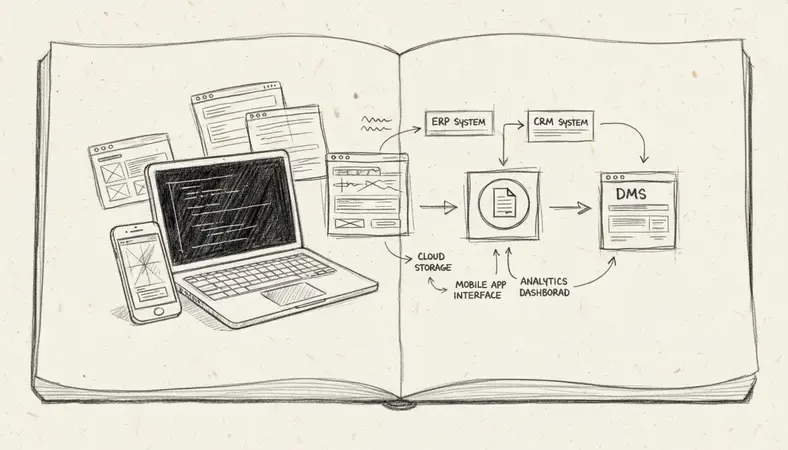
Plan Integration Points with Existing Systems carefully. Identify which applications need to connect with the DMS warehouse and map out data flow requirements. Common integration points include email systems, accounting software, and customer relationship management platforms.
Implement Gradual User Training and Rollout rather than switching everything at once. Start with a pilot group, gather feedback, and refine processes before expanding to the entire organization. This approach reduces disruption and allows for course corrections.
Establish clear governance policies for document retention, access controls, and compliance requirements. Define who can access what information, how long documents should be retained, and what approval processes are required for sensitive materials.
Create Backup and Disaster Recovery Procedures to protect against data loss. Even cloud-based systems need backup strategies and recovery plans to ensure business continuity during outages or security incidents.
DMS Warehouse for Enterprise Compliance
Compliance requirements drive many organizations toward DMS warehouse solutions. Regulated industries face strict documentation standards that manual systems simply cannot maintain reliably.
Automated audit trails capture every document interaction, creating detailed logs that satisfy regulatory requirements. These systems record who accessed what information, when changes occurred, and what approvals were granted — all without manual intervention.
Retention policy enforcement automatically manages document lifecycles according to legal and regulatory requirements. The system can flag documents for review, archive outdated materials, and ensure nothing gets deleted prematurely.
Regulatory reporting capabilities generate compliance reports automatically, pulling data from audit trails and document metadata. This automation eliminates the time-consuming manual process of gathering compliance information during audits.
Secure document sharing enables controlled external access for auditors, clients, and partners without compromising security. Organizations can provide temporary access to specific documents while maintaining complete control over permissions and tracking.
Compliance Insight: Organizations using automated DMS warehouse systems report 60-80% reduction in compliance preparation time compared to manual document management approaches.
Role-Based Access Controls ensure employees only see documents relevant to their responsibilities. This principle of least privilege reduces security risks while maintaining operational efficiency.
Scalability and Performance Considerations
DMS warehouse performance directly impacts user adoption and productivity. Systems that respond slowly or become unreliable under load quickly lose user confidence and organizational support.
Storage architecture planning determines how well the system handles growth. Cloud-based solutions typically offer better scalability than on-premise installations, but organizations need to understand cost implications as storage volumes increase.
User concurrency management ensures the system performs well when multiple users access documents simultaneously. Peak usage periods often reveal performance bottlenecks that weren't apparent during testing with smaller user groups.
Search index optimization maintains fast search performance as document volumes grow. Large repositories require sophisticated indexing strategies to deliver quick search results without consuming excessive system resources.
Bandwidth and Network Considerations affect user experience, especially for remote workers or organizations with multiple locations. Document repositories with large files need adequate network infrastructure to support efficient access.
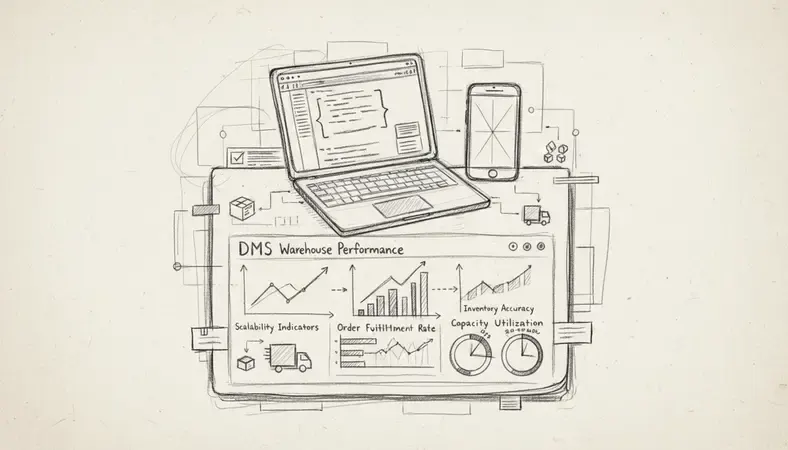
Integration performance impact must be evaluated when connecting multiple business systems. Each integration point adds complexity and potential performance overhead that needs monitoring and optimization.
Backup and Recovery Speed becomes more critical as document volumes increase. Organizations need backup strategies that don't impact system performance during business hours while ensuring rapid recovery capabilities.
DMS Warehouse Pricing and ROI
Understanding the true cost and return on investment for DMS warehouse solutions requires looking beyond initial licensing fees to include implementation, training, and ongoing operational costs.
Licensing Models and Cost Structures vary significantly between vendors. Some charge per user, others price by storage volume, and enterprise solutions often use custom pricing based on specific requirements and usage patterns.
Implementation and Setup Costs typically include data migration, system configuration, integration development, and user training. These one-time expenses often equal or exceed the first year's licensing costs but are essential for successful deployment.
Ongoing operational expenses include system administration, user support, backup services, and regular maintenance. Cloud-based solutions often include these services in subscription pricing, while on-premise installations require dedicated IT resources.
Productivity Gains and Cost Savings provide the primary ROI justification. Organizations typically see immediate benefits from reduced document search time, faster approval processes, and eliminated duplicate work caused by version confusion.
Compliance cost reduction offers significant savings for regulated industries. Automated compliance reporting and audit trail generation can reduce legal and administrative costs substantially compared to manual documentation processes.
Risk mitigation value includes protection against document loss, unauthorized access, and compliance violations. While harder to quantify, these benefits often justify DMS warehouse investments for risk-conscious organizations.
ROI Calculation Framework
| Cost Category | Typical Range | ROI Impact |
|---|---|---|
| Licensing (Annual) | $50-500 per user | Direct cost |
| Implementation | 50-200% of annual licensing | One-time investment |
| Time Savings | 2-8 hours per user per week | Primary ROI driver |
| Compliance Reduction | 40-80% of manual costs | Significant for regulated industries |
| Error Prevention | 10-30% reduction in rework | Quality improvement benefit |
Most organizations achieve positive ROI within 12-18 months of implementation when they properly account for productivity improvements and cost reductions across all affected business processes.
Common Questions About DMS Warehouse
What's the difference between a DMS warehouse and regular cloud storage?
A DMS warehouse provides structured document management with automated workflows, version control, and compliance features that regular cloud storage lacks. While cloud storage offers basic file sharing and synchronization, DMS warehouses include sophisticated search capabilities, metadata management, and integration with business processes.
Cloud storage works well for simple file sharing, but organizations with complex document workflows, compliance requirements, or large user bases need the advanced features that DMS warehouses provide. The structured approach of DMS warehouses eliminates the chaos that often develops in shared cloud storage environments.
How long does DMS warehouse implementation typically take?
Implementation timelines vary based on organization size, document volume, and integration complexity. Small businesses with straightforward requirements often complete implementation in 4-8 weeks, while large enterprises with complex integrations may need 6-12 months.
The key factors affecting timeline include data migration volume, number of system integrations, user training requirements, and custom workflow development. Organizations that invest time in planning and preparation typically see faster implementations and better user adoption.
Can DMS warehouses integrate with existing business software?
Modern DMS warehouse platforms offer extensive integration capabilities through APIs, pre-built connectors, and middleware solutions. Common integrations include email systems, CRM platforms, accounting software, and project management tools.
The integration approach depends on your existing software ecosystem and specific workflow requirements. Some integrations require custom development, while others use standard connectors that vendors provide. LogicalDOC and similar platforms typically offer integration support for popular business applications.
What security measures protect documents in DMS warehouses?
DMS warehouses implement multiple security layers including encryption for data in transit and at rest, role-based access controls, and comprehensive audit trails. Many platforms also include features like digital watermarking, document expiration, and remote access revocation.
Security measures often exceed those available in traditional file storage systems. Organizations can control access at the document level, track all user interactions, and maintain detailed logs for compliance purposes. Cloud-based solutions typically include enterprise-grade security infrastructure that would be expensive for individual organizations to implement.
How do you measure DMS warehouse success after implementation?
Success metrics typically include reduced document search time, faster approval processes, improved compliance reporting, and increased user satisfaction. Organizations should establish baseline measurements before implementation to track improvements accurately.
Key performance indicators often include time spent searching for documents, approval cycle duration, compliance preparation time, and user adoption rates. Most organizations see measurable improvements within the first few months of implementation when the system is properly configured and users are adequately trained.
Final Thoughts
Building an effective DMS warehouse requires the right combination of platform capabilities, implementation planning, and organizational commitment. The resources and considerations covered in this guide provide the foundation for making informed decisions about your document management strategy.
Streamline your document workflows at LogicalDOC — organize, share, and secure your business documents with our comprehensive DMS solution. Ready to get started? Visit LogicalDOC to learn more.

Latest posts by Cristian Fulger (see all)
- Best Content Management Systems Worth Trying - 04/05/2026
- Warehouse System Tools and Resources - 04/04/2026
- What Are Warehouse Management Systems? - 04/03/2026
- Project Management Tools Explained - 04/02/2026
- Top CMMS Solutions Worth Trying - 03/31/2026